

Once you are doing relational databases, LEFT JOIN in SQL is essential for data merging, binding, and manipulating. LEFT JOIN allows you to merge multiple tables without losing records from your main table, this would be indispensable for SQL queries.
This Ultimate guide covers the following:
- 1. Introduction
- 2. What is LEFT JOIN in SQL?
- 3. LEFT JOIN vs LEFT OUTER JOIN
- 4. LEFT JOIN Syntax
- 5. Beginner-Friendly Example or Student
- 6. LEFT JOIN in SQL With WHERE Clause (Common Pitfall)
- 7. LEFT JOIN Multiple Tables
- 8. LEFT JOIN vs INNER JOIN vs RIGHT JOIN vs FULL OUTER JOIN
- 9. LEFT JOIN with Subqueries and CTEs
- 10. Handling NULL Values in LEFT JOIN
- 11. Indexing Approaches for LEFT JOIN in SQL
- 12. LEFT JOIN Performance Optimization
- 13. Practical LEFT JOIN in SQL Examples
- 14. Common LEFT JOIN Mistakes: Common pitfalls
- 15. LEFT JOIN in SQL Interview Questions
- 1. Difference between LEFT JOIN and INNER JOIN?
- 2. How to find customers without orders?
- 3. Can LEFT JOIN return duplicates? How to handle?
- 4. When is LEFT JOIN slower than INNER JOIN?
- 5. Can you LEFT JOIN more than two tables?
- 6. How to optimize LEFT JOIN queries?
- 7. How to handle NULLs in LEFT JOIN in SQL?
- 8. What is the difference between LEFT JOIN and RIGHT JOIN?
- 16. Advanced LEFT JOIN Patterns
- 17. Summary
- 18. LEFT JOIN FAQs (Short & Clear)
Once you complete this article, you’ll be able to write efficient LEFT JOIN queries; other than that, you’ll be able to avoid common mistakes and optimize performance with LEFT JOIN in SQL across multiple databases.
1. Introduction
Table use to store data. In relational databases, data is stored in multiple tables. For example, person data may be stored in employee information, department, and payments in separate tables. If you want a complete report showing all employees, including those who haven’t placed in a department, you need a LEFT JOIN.
LEFT JOIN is useful to:
- Analytics: fetch all data from a primary table to avoid missing entries
- Backend: Merge multiple datasets into a single dataset
There are other types of joints like INNER JOIN, RIGHT JOIN, or FULL OUTER JOIN that behave differently: INNER JOIN is used to match rows, RIGHT JOIN returns all right-table rows with matches in left, and FULL OUTER JOIN returns all rows from both tables. LEFT JOIN is mostly used because it preserves all rows from the left side table.
Tip: Use LEFT JOIN each time the fullness of the primary table matters more than connected tables.
Practical scenario: An e-commerce platform wants a list of all goods, including those with zero sales. LEFT JOIN allows retrieving all products while joining with the sales table to show sales numbers, with NULL where no sales exist.
2. What is LEFT JOIN in SQL?
A LEFT JOIN (or LEFT OUTER JOIN) returns:
- All rows from the left table (Apply with conditions)
- Matching rows from the right-side table
- NULL for non-matching rows for the right side table.
Left Table (All Rows)
├──────────────┐
│ LEFT JOIN │ → All left rows + matching right rows
└──────────────┘
Right Table (Only Matching Rows)
Example:
Assume our common example has an employees table and a departments table. Use LEFT JOIN to guarantee all employees are included, even if some of them are not assigned to any department.
Comparison: Think of LEFT JOIN as a “master list” — you keep all items from your main list and fill in details from a secondary list wherever available.
Visual Example:
| Employee | Dept |
| Alice | Sales |
| Bob | NULL |
| Carol | HR |
- Bob has not assigned to any department yet, but LEFT JOIN confirms he is included.
LEFT JOIN is also important when finding gaps in records, such as missing transactions, unassigned tasks, or incomplete reports.
3. LEFT JOIN vs LEFT OUTER JOIN
Are LEFT JOIN and LEFT OUTER JOIN equivalent?
Yes. The keyword OUTER is optional. It increases readability but does not change the result. OUTER is used to improve the readability of the query.
--
SELECT * FROM employees e
LEFT JOIN departments d ON e.department_id = d.department_id;

SELECT * FROM employees e
LEFT OUTER JOIN departments d ON e.department_id = d.department_id;

--
Above Both queries return all employees, and mapping department data where available, and NULL values for employees without departments themselves.
Key takeaway: Use LEFT JOIN for simplicity; OUTER is purely for readability.
4. LEFT JOIN Syntax
--
🎯 Standard syntax:
SELECT columns
FROM left_table
LEFT JOIN right_table
    ON left_table.key1 = right_table.key1
And left_table.key2 = right_table.key2;
🎯 Example:
SELECT e.employee_id, e.name, d.department_name
FROM employees e
LEFT JOIN departments d
    ON e.department_id = d.department_id;

--
In this example
- Returns all employees
- Shows department names if the employee is assigned to the department
- Displays NULL for employees without departments
Database-specific notes:
- MySQL, PostgreSQL, SQLite: same syntax
- SQL Server and Oracle supports OUTER keyword
5. Beginner-Friendly Example or Student
In this simple example left join is used to merge the customers and order tables to view customer name and order amount for each customer. Below is the sample dataset for understanding the concept of left join in SQL.
Customers Table
| customer_id | name |
| 1 | Anna |
| 2 | John |
| 3 | Michael |
Orders Table
| order_id | customer_id | amount |
| 101 | 1 | 150 |
| 102 | 1 | 200 |
| 103 | 2 | 50 |
Query:
--
SELECT c.name, o.amount
FROM customers c
LEFT JOIN orders o
    ON c.customer_id = o.customer_id;
--
Result:
| name | amount |
| Anna | 150 |
| Anna | 200 |
| John | 50 |
| Michael | NULL |
Customer Michael appears NULL for orders, meaning that despite having no orders, this is the main and key LEFT JOIN behavior.
Extended Example:
This example was extended with 3 table adding the Payment table. Suppose we add a Payments table and want all customers with order and payment information:
--
SELECT c.name, o.amount, p.payment_date
FROM customers c
LEFT JOIN orders o ON c.customer_id = o.customer_id
LEFT JOIN payments p ON o.order_id = p.order_id;

--
This result shows all customers, orders if available, and additionally payment info if present. As you know, now Missing orders or payments appear as NULL as a LEFT JOIN key rule.
6. LEFT JOIN in SQL With WHERE Clause (Common Pitfall)
Another Rule: Filter right-table columns inside the JOIN ON clause, not WHERE. Then remove the 0 amount orders once they join the tables
--
❌ Incorrect usage:
SELECT *
FROM customers c
LEFT JOIN orders o ON c.customer_id = o.customer_id
WHERE o.amount > 0;
•	Removes NULL rows → behaves like INNER JOIN Not good for performance
✅ Correct usage:
SELECT *
FROM customers c
LEFT JOIN orders o
    ON c.customer_id = o.customer_id AND o.amount > 0;

--
Advanced Example:
--
SELECT e.name, d.department_name
FROM employees e
LEFT JOIN departments d
    ON e.department_id = d.id AND d.active = 1;

--- Keeps all employees because there are no conditions for employees
- Only join active departments once joining the table
- Employees without active departments get NULL
7. LEFT JOIN Multiple Tables
You can chain several LEFT JOINs to combine multiple datasets while preserving all rows from the left-most table. There are no limitations, but merging several tables into a single unit can cause performance problems once you have millions of records in the right-side tables.
Also, database indexes are very critical things to join tables. No matter if it’s LEFT JOIN or any other type, merge the table with a joining method like HASH JOIN or LOOP JOIN. An index helps to join tables using those key index values, and an index helps to merge records quickly.
Example: Employees, Departments, Managers, Locations
--
SELECT e.name, d.department_name, m.manager_name, l.location_name
FROM employees e
LEFT JOIN departments d ON e.department_id = d.id
LEFT JOIN managers m ON d.manager_id = m.id
LEFT JOIN locations l ON d.location_id = l.id;

--
- Retains all employees
- Shows department, manager, and location where available
- NULL appears if any right-side data is missing
Problem: Here we are merging all the tables and all the rows with employees. But at a single time, no one works all the data with a single time. So, fetch first records from the employee first or limit record is good to reduce full table scans for the right tables.
Use Case: Reporting dashboards, HR analytics, and multi-table data aggregation.
Tips:
- Use meaningful aliases (e, d, m, l)
- Only select required columns to improve performance
- Avoid joining unnecessarily large tables if not required
8. LEFT JOIN vs INNER JOIN vs RIGHT JOIN vs FULL OUTER JOIN
This is the summary of the matching table with different join types. Hope the image does the same more meaningful way.
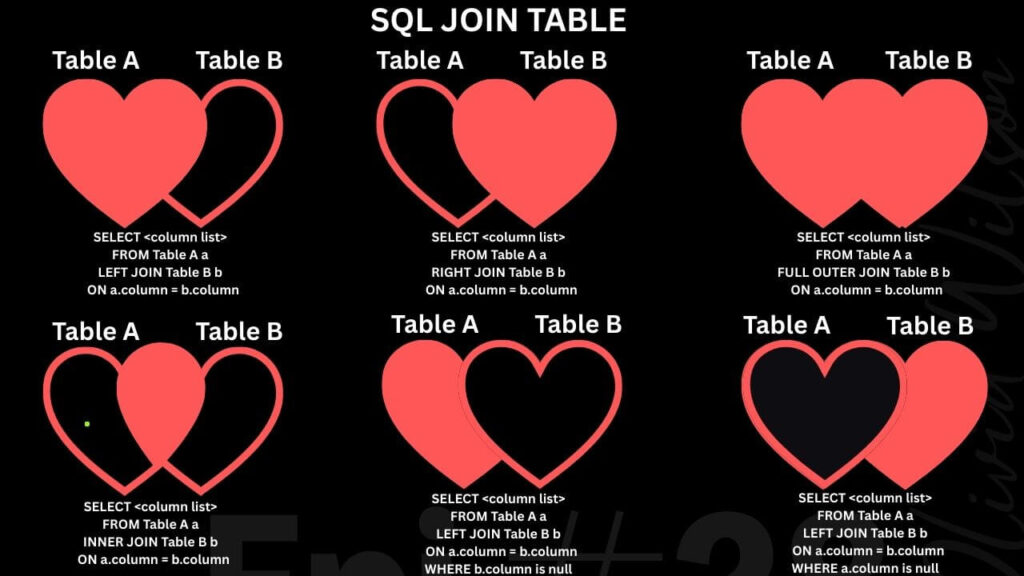
| Join Type | Returns |
| INNER JOIN | Only matching rows from both table |
| LEFT JOIN | All left rows + matching right rows, if no matches then NULLs |
| RIGHT JOIN | All right rows + matching left rows, if no matches then NULLs |
| FULL OUTER JOIN | All rows from both tables, NULL where no match |
Example Scenario: Lets continue the employee example
- Employees table: all employees
- Departments table: some employees are unassigned
- INNER JOIN: Only employees who have a department assigned
- LEFT JOIN: All employees, NULL for department columns for unassigned employees for a specific department
- RIGHT JOIN: All departments, NULL for employee columns that no employees still assign with department.
- FULL OUTER JOIN: Combines all employees and all departments. NULL for department or employee columns if there are no matches.
Tip: This is important for coding; LEFT JOIN is generally preferred for readability and primary-table completeness.
9. LEFT JOIN with Subqueries and CTEs
LEFT JOIN can be combined with subqueries or CTEs for more advanced queries. This is good for improving query performance.
Using a CTE (Common Table Expression): CTEs execute first
--
WITH CustomerOrders AS (
    SELECT customer_id, SUM(amount) AS total_amount
    FROM orders
    GROUP BY customer_id
)
SELECT c.name, co.total_amount
FROM customers c
LEFT JOIN CustomerOrders co
    ON c.customer_id = co.customer_id;

--
when executing the Common Table Expression, and then merge records using a left join. Here, cte use like a right table to the left table.
Using a Subquery:
--
SELECT c.name, o.total_amount
FROM customers c
LEFT JOIN (
    SELECT customer_id, SUM(amount) AS total_amount
    FROM orders
    GROUP BY customer_id
) o ON c.customer_id = o.customer_id;

--- Ensures all customers are listed
- Missing orders show as NULL
10. Handling NULL Values in LEFT JOIN
When no match exists, right-table columns return NULL. Handling NULLs is crucial for clean reporting. As you know now LEFT join in SQL first outcome behavior is return NULL for no matches. You can filter null in Join Conditions, or you can handle them by setting some values as default.
Example: Replace NULL with zero
--
SELECT c.name, COALESCE(o.amount, 0) AS order_amount
FROM customers c
LEFT JOIN orders o ON c.customer_id = o.customer_id;

--
- COALESCE or NVL replaces NULLs with 0 , SQL Server uses ISNULL()
- MySQL/PostgreSQL use COALESCE()
- This is useful for totals, sums, and calculations. Good to set 0 if null for reporting
Tip: Always predict NULLs in LEFT JOIN results to block errors in analytics or reports.
11. Indexing Approaches for LEFT JOIN in SQL
Indexes do not perform all the time, but most of the time, it’s good to have an index. Its same for Join tables. Proper indexing dramatically improves LEFT JOIN performance, especially on huge tables.
These are small tips for common join tables below. But you can SEARCH lot more related to INDEX on ennicode.com
1. Index the right-table join key: foreign key as an index
CREATE INDEX idx_orders_customer_id ON orders(customer_id);
2. Composite Indexes: if where condition contains sale_date
CREATE INDEX idx_sales_customer_date ON sales(customer_id, sale_date);
3. Covering Indexes: if a condition contain amount
CREATE INDEX idx_orders_customer_amount ON orders(customer_id, amount);
4. Primary & Foreign Key Indexing
- Ensure foreign keys used in JOIN are indexed
5. Avoid Over-Indexing
- Too many indexes can slow INSERT/UPDATE/DELETE operations
6. Execution Plan
- Use EXPLAIN or EXPLAIN PLAN to verify that indexes are being used
Tip: Always index columns often used in JOINs or filter conditions for faster query execution.
12. LEFT JOIN Performance Optimization
📚 Best practices for large datasets:
- Index join keys as described above
- Avoid SELECT *; select only the required columns to save memory
- Filter left-table rows in the WHERE clause that will reduce the matches
- Filter right-table rows inside JOIN ON when merging the right table
- Limit unnecessary joins: joins take time if its hash/ loop
- Consider temporary tables or materialized views for pre-aggregated results. Those are not to be updated every time fromthe backend
Example: Optimized query for reporting
--
SELECT c.name, SUM(o.amount) AS total_sales
FROM customers c
LEFT JOIN orders o
    ON c.customer_id = o.customer_id AND o.status='completed'
WHERE c.active = 1
GROUP BY c.name;

--- Filters applied in JOIN and WHERE to reduce the join record count.
- Reduces unnecessary rows early
13. Practical LEFT JOIN in SQL Examples
1. Customers without orders
--
SELECT c.name
FROM customers c
LEFT JOIN orders o ON c.customer_id = o.customer_id
WHERE o.order_id IS NULL;

--
2. Employees without departments
--
SELECT e.*
FROM employees e
LEFT JOIN departments d ON e.department_id = d.id
WHERE d.id IS NULL;

--
3. Multi-table reporting
--
SELECT e.name, d.department_name, COUNT(o.order_id) AS total_orders
FROM employees e
LEFT JOIN departments d ON e.department_id = d.id
LEFT JOIN orders o ON e.employee_id = o.employee_id
GROUP BY e.name, d.department_name;

--
4. Combining CTEs with LEFT JOIN in SQL
Provides all customers with sales totals, 0 for none
--
WITH MonthlySales AS (
    SELECT customer_id, SUM(amount) AS total_amount
    FROM orders
    WHERE order_date >= '2026-01-01'
    GROUP BY customer_id
)
SELECT c.name, COALESCE(ms.total_amount,0) AS jan_sales
FROM customers c
LEFT JOIN MonthlySales ms
    ON c.customer_id = ms.customer_id;

--
14. Common LEFT JOIN Mistakes: Common pitfalls
Those are not huge mistakes, but they can have a huge effect on the final result. Even skilled developers make mistakes with LEFT JOIN. Common pitfalls include:
1. Filtering right-table columns in WHERE Condition
- Converts LEFT JOIN to INNER JOIN if you don’t want NULL
- Solution: filter in the JOIN ON clause
2. Duplicate rows from multiple matches
- If the right table has multiple matching records, LEFT JOIN repeats the left rows
- Solution: use DISTINCT, GROUP BY, or aggregate functions
3. Joining unrelated tables
- Produces unnecessary NULLs and bloated datasets and drop perforamnce
4. Missing indexes
- Add an index for Large tables if needed. Without proper indexing, queries slow down queries
5. Not handling NULLs
- LEFT JOIN can produce NULLs;
6. Over-joining
This is similar to joining unrelated tables. LEFT JOIN several large tables unnecessarily increases query execution time
Pro Tip: Test queries regularly on small datasets first, check execution plans, and gradually scale.
15. LEFT JOIN in SQL Interview Questions
1. Difference between LEFT JOIN and INNER JOIN?
- LEFT JOIN keeps all left-table rows; INNER JOIN only keeps matching rows
2. How to find customers without orders?
--
SELECT c.name
FROM customers c
LEFT JOIN orders o ON c.customer_id = o.customer_id
WHERE o.order_id IS NULL;

--
3. Can LEFT JOIN return duplicates? How to handle?
- Yes, if multiple matches exist on the right table
- Handle with DISTINCT, GROUP BY, or aggregation
4. When is LEFT JOIN slower than INNER JOIN?
- Large right tables with no indexes increase joining time
- Filtering in WHERE instead of JOIN ON itself
5. Can you LEFT JOIN more than two tables?
- Yes, chain multiple LEFT JOINs with proper ON conditions. But test for execution time
6. How to optimize LEFT JOIN queries?
- Index join keys
- Avoid SELECT * by adding proper column names
- Filter left-table rows in WHERE and right-table rows in JOIN ON condition
7. How to handle NULLs in LEFT JOIN in SQL?
- Use COALESCE, NVL, ISNULL, or another type of null handling function
8. What is the difference between LEFT JOIN and RIGHT JOIN?
- LEFT JOIN keeps all left-table rows
- RIGHT JOIN keeps all right-table rows
16. Advanced LEFT JOIN Patterns
Key Insight: LEFT JOIN can handle complex scenarios, from simple lookups to advanced aggregations.
17. Summary
The LEFT JOIN is a powerful and handy SQL operation:
- Keeps all rows from the main table
- Retrieves matching rows from related tables
- Inserts NULL where no match exists
We explored:
- Classic LEFT JOIN syntax
- LEFT JOIN vs LEFT OUTER JOIN
- LEFT JOIN with WHERE clause pitfalls
- LEFT JOIN multiple tables, subqueries, and CTEs
- Indexing strategies for optimal performance
- Common mistakes and pitfalls
- Advanced patterns with aggregates and window functions
- Interview questions and FAQs
Takeaway: LEFT JOIN ensures data completeness, making it essential for reporting, analytics, dashboards, and backend systems. Proper indexing, filtering, and knowing NULLs will improve performance and reliability.
18. LEFT JOIN FAQs (Short & Clear)
1. Is LEFT JOIN the same as LEFT OUTER JOIN?
- Yes, “OUTER” is optional
2. Which databases support LEFT JOIN in SQL?
- MySQL, PostgreSQL, Oracle, SQL Server, SQLite, MariaDB, Snowflake, BigQuery, and more
3. Can LEFT JOIN be combined with subqueries?
- Yes, for aggregated or derived tables
4. Does LEFT JOIN work with CTEs?
- Yes, ideal for complex queries
5. Can LEFT JOIN use indexes?
- Yes, index the join key for performance
6. When should I use LEFT JOIN in SQL?
- When completeness of the primary table is essential
Reference: https://www.geeksforgeeks.org/sql/sql-left-join/ , https://www.w3schools.com/sql/sql_join_left.asp
