

In this article, I plan to describe what a common table expression is, and how to write sql common table expression in database programming languages. Other than that, it will explain the performance impact and provide simple to complex examples to illustrate it. So, the agenda will be like below
- What is a common table expression
- How to write a common table expression
- Simple SQL CTE example
- Complex SQL CTE example
- Multiple cte sql
- Recursive Common Table Expressions (CTEs)
- Performance impact
- CTEs in UPDATE, DELETE Statements
What are common table expressions (CTE)
Common Table Expression keep the result set temporarily to use later in the same query or block. The temporal result set is able to be used multiple times in a query without re-executing the similar code block repeatedly.
To handle hierarchical queries or recursive queries, CTE helps to simplify those. And it helps to improve performance because of results are kept in memory to use later. CTE performs well compared to other ways of temporary tables or subqueries, or using the re-execution method, or fetching the same records from the table
PL/SQL, Common Table Expression (CTEs) allow you to more structure your complex code into a more readable, understandable, maintainable way, and the good thing is we can use them multiple times in the same query. Result set clean up after query execution.
How to write common expressions
Start with keyword “WITH” and include common expressions inside the WITH block. There can be multiple blocks with different given names for blocks. Then we can use this block in the main query later. Below is the syntax for it.
SQL CTE syntax
--
WITH
  cte1 AS (SELECT a, b FROM table1),
  cte2 AS (SELECT c, d FROM table2)
AS (
    -- Query that defines the CTE -- Main query
    SELECT ...
    FROM ...
    WHERE ...
)
--
cte1 and cte2 are the given names of tables. These names will be referred to later in the main query.
AS refers to each table or subquery. The Main Query comes later after the block.
Main Query comes after the CTE, and the main query can refer to the CTE attributes. Because all the values have already been fetched
Simple SQL CTE example
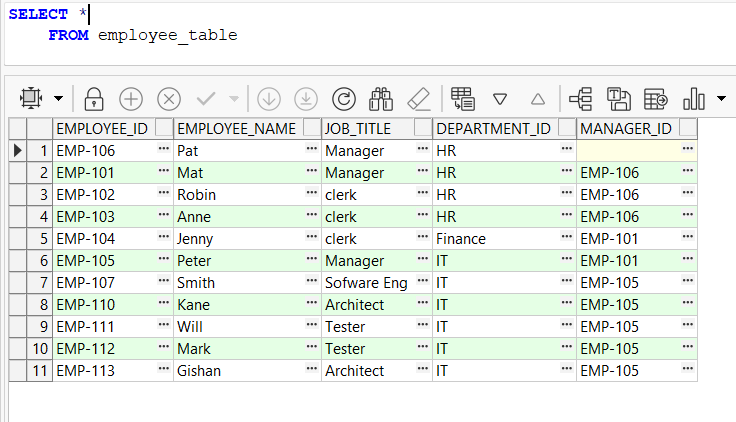
I would like to create an employee table to explain common table expressions. Here in this dummy dataset, inserted required data has been inserted that is useful for simple and complex examples. A simple example is not the best use of SQL common table expression. But for help to understand the execution.
--
CREATE TABLE employee_table(
    employee_id VARCHAR2(50) ,
    employee_name VARCHAR2(100) ,
    job_title VARCHAR2(50) ,
    department_id VARCHAR2(50) ,
    manager_id   VARCHAR2(50) ,
    PRIMARY KEY(employee_id),
FOREIGN KEY (manager_id) REFERENCES employee_table(employee_id)
);

declare
BEGIN

    INSERT INTO employee_table (employee_id, employee_name, job_title ,department_id, manager_id   )
   VALUES ('EMP-'||106,'Pat', 'Manager', 'HR',null);
   INSERT INTO employee_table (employee_id, employee_name, job_title ,department_id, manager_id   )
   VALUES ('EMP-'||101,'Mat', 'Manager', 'HR', 'EMP-'||106);
    INSERT INTO employee_table (employee_id, employee_name, job_title ,department_id, manager_id   )
   VALUES ('EMP-'||102,'Robin', 'clerk', 'HR', 'EMP-'||106);
    INSERT INTO employee_table (employee_id, employee_name, job_title ,department_id, manager_id   )
   VALUES ('EMP-'||103,'Anne', 'clerk', 'HR', 'EMP-'||106);
    INSERT INTO employee_table (employee_id, employee_name, job_title ,department_id, manager_id   )
   VALUES ('EMP-'||104,'Jenny', 'clerk', 'Finance', 'EMP-'||101);
    INSERT INTO employee_table (employee_id, employee_name, job_title ,department_id, manager_id   )
   VALUES ('EMP-'||105,'Peter', 'Manager', 'IT', 'EMP-'||101);
    INSERT INTO employee_table (employee_id, employee_name, job_title ,department_id, manager_id   )
   VALUES ('EMP-'||107,'Smith', 'Sofware Eng', 'IT', 'EMP-'||105);
    INSERT INTO employee_table (employee_id, employee_name, job_title ,department_id, manager_id   )
   VALUES ('EMP-'||110,'Kane', 'Architect', 'IT', 'EMP-'||105);
    INSERT INTO employee_table (employee_id, employee_name, job_title ,department_id, manager_id   )
   VALUES ('EMP-'||111,'Will', 'Tester', 'IT', 'EMP-'||105);
    INSERT INTO employee_table (employee_id, employee_name, job_title ,department_id, manager_id   )
   VALUES ('EMP-'||112,'Mark', 'Tester', 'IT', 'EMP-'||105);
    INSERT INTO employee_table (employee_id, employee_name, job_title ,department_id, manager_id   )
   VALUES ('EMP-'||113,'Gishan', 'Architect', 'IT', 'EMP-'||105);

end;
==
By using the above dataset, I’m going to fetch employee information. First create the common expressions using the “WITH” keyword. Then write the main query and retrieve the information inside the CTE.
--
-- Define a Common Table Expression (CTE)
WITH ItEmployees AS (
    SELECT employee_id, employee_name, manager_id , job_title
    FROM employee_table
    WHERE department_id = 'IT'
)
-- Use the CTE to select software engineering employees
SELECT employee_id, employee_name, manager_id
FROM ItEmployees
Where job_title ='Sofware Eng'
Union
-- Use the CTE to select 'Architect' employees
SELECT employee_id, employee_name, manager_id
FROM ItEmployees
Where job_title = 'Architect'
--
AS you know, this is not the best way to filter IT SOFTWARE ENGINEERS. But I wrote this to explain a simple way of working with CTE’s Here, we added all the IT staff as common table expressions.
Then, by using fetch, all the employees who work as software engineers in the first section of the union and the next section of the union use the same CTE to fetch all the architects in the IT department.
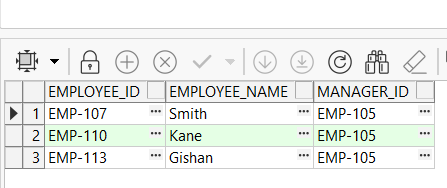
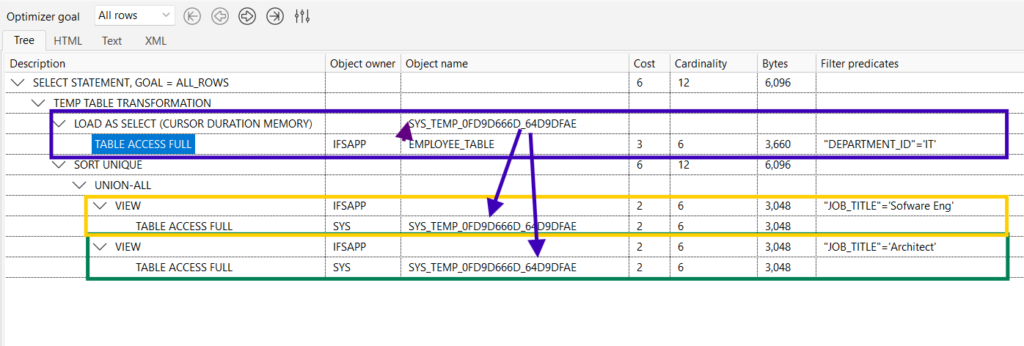
So, the example shows there is a common section that is used by the union. Common table expressions help to reduce one code block execution time because of its executed earlier and are used in both union codes. Also improves the performance of the code.
Complex SQL CTE example
Here I’m looking to get the total salary for each employee who works in the IT department, and job roles include SOFTWARE ENG and ARCHITECT. This looks duplicates similar conditions in both sections in the union.
--
SELECT employee_id, employee_name, SUM(es.amount * es.converstion_rate) as salary
FROM ItEmployees e
JOIN Employee_Salary ES ON e. employee_id = es. employee_id
Where department_id = 'IT' and job_title ='Sofware Eng'
GROUP BY e.employee_id
Union
-- Use the CTE to select 'Architect' employees
SELECT employee_id, employee_name, SUM(es.amount * es.converstion_rate) as salary
FROM ItEmployees
JOIN Employee_Salary ES ON e. employee_id = es. employee_id
Where department_id = 'IT' and  job_title = 'Architect'
GROUP BY e.employee_id
--
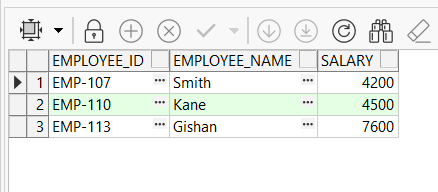
I would like to add CTE for this case and make this more readable and make this simplify. First, change the common section into CTE and execute logic in the main query. You can see there is an aggregate function in the query with includes a group by clause.
-- Define a Common Table Expression (CTE)
WITH ItEmployees AS (
    SELECT e.employee_id, employee_name, es.amount, es.converstion_rate, job_title
    FROM employee_table e
    JOIN Employee_Salary ES ON e.employee_id = es.employee_id
    WHERE department_id = 'IT'
)
-- Use the CTE to select software engineering employees
SELECT employee_id, employee_name, SUM(amount * converstion_rate) as salary
FROM ItEmployees
Where job_title ='Sofware Eng'
GROUP BY employee_id,employee_name
Union
-- Use the CTE to select 'Architect' employees
SELECT employee_id, employee_name, SUM(amount * converstion_rate) as salary
FROM ItEmployees
Where job_title = 'Architect'
GROUP BY employee_id,employee_name
--
Below is the Data insertion code for the sample dataset in the employee salary table.
CREATE TABLE Employee_Salary (
    employee_id VARCHAR2(50) ,
    employee_sal_id VARCHAR2(100) ,
    converstion_rate NUMBER ,
    amount NUMBER ,
    PRIMARY KEY(employee_id,employee_sal_id)
);
declare
BEGIN

    INSERT INTO Employee_Salary (employee_id, employee_sal_id, converstion_rate ,amount )
   VALUES ('EMP-'||107,'1', 1, 1000);
   INSERT INTO Employee_Salary (employee_id, employee_sal_id, converstion_rate ,amount )
   VALUES ('EMP-'||107,'2', 1, 500);
   INSERT INTO Employee_Salary (employee_id, employee_sal_id, converstion_rate ,amount )
   VALUES ('EMP-'||107,'3', 1, 700);
    INSERT INTO Employee_Salary (employee_id, employee_sal_id, converstion_rate ,amount )
   VALUES ('EMP-'||107,'4', 1, 2000);
    INSERT INTO Employee_Salary (employee_id, employee_sal_id, converstion_rate ,amount )
   VALUES ('EMP-'||113,'1', 1, 6000);
    INSERT INTO Employee_Salary (employee_id, employee_sal_id, converstion_rate ,amount )
   VALUES ('EMP-'||113,'2', 1, 700);
    INSERT INTO Employee_Salary (employee_id, employee_sal_id, converstion_rate ,amount )
   VALUES ('EMP-'||113,'3', 1, 800);
    INSERT INTO Employee_Salary (employee_id, employee_sal_id, converstion_rate ,amount )
   VALUES ('EMP-'||113,'4', 1, 100);
    INSERT INTO Employee_Salary (employee_id, employee_sal_id, converstion_rate ,amount )
   VALUES ('EMP-'||110,'1', 1, 1000);
    INSERT INTO Employee_Salary (employee_id, employee_sal_id, converstion_rate ,amount )
   VALUES ('EMP-'||110,'2', 1, 2000);
    INSERT INTO Employee_Salary (employee_id, employee_sal_id, converstion_rate ,amount )
   VALUES ('EMP-'||110,'3', 1, 1500);
end;
--
Multiple CTE SQL
Multiple common table expressions can be used to calculate complex mathematics or fetch values from different tables that are needed for the main query. For multiple CTEs, there is a single WITH clause and comma-separated different query blocks with their own CTE name. Those CTE names can be used later in the code, OR the same CTE block after defining it.
WITH EmpTotalSalary AS (
    -- Step 1: Calculate total salary for each employee
    SELECT employee_id, SUM(es.amount * es.converstion_rate)  AS TotalSalary
    FROM employee_table
    JOIN Employee_Salary ES ON e. employee_id = es. employee_id
    GROUP BY e.employee_id
),
AverageSalary AS (
    -- Step 2: Calculate the average total salary across all employees
    SELECT AVG(TotalSalary) AS AverageTotalSalary
    FROM EmpTotalSalary
),
HighSalaryEmployee AS (
    -- Step 3: Filter the employee with above-average total salary
    SELECT employee_id, TotalSalary
    FROM EmpTotalSalary
    WHERE TotalSalary > (SELECT AverageTotalSalary FROM AverageSalary)
)
-- Step 4: Rank the high-salary employees
SELECT employee_id, TotalSalary, RANK() OVER (ORDER BY TotalSalary DESC) AS SalaryRank
FROM HighSalaryEmployee;
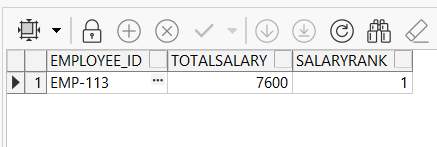
In this code, there are records that are above the average salary employees return.
- First CTE: Calculate the total salary for each employee
- Second CTE: Calculate the average total salary across all employees (SQL AVG)
- Third CTE: Filter the employee with an above-average total salary
- Main Query fetches data from the last CTE. In the main query, able to fetch all 3 Common table expressions. But here I just need the last
Recursive Common Table Expressions (CTEs)
Recursive CTEs are one of the advanced features of SQL. Hierarchical data structures, such as an organizational structure, are one of the examples. If there is a parent-child relationship with records, that is called a hierarchical structure. CTE can use such situations. There is another way to do the same with connect by prior.
How do Recursive CTEs work?
In recursive CTE refers to itself and then iterates over datasets until it builds a complete hierarchy. There are two main components in recursive CTE. Those two sections join with the UNION keyword. Below are the two elements.
- Anchor Member – Start point of the query that supplies the initial result set.
- Recursive Member – This element recursively calls the CTE itself, making use of it to move to the next level.
Syntax:
--
WITH cte_name AS (
    -- Anchor member (base case)
    SELECT column1, column2, ...
    FROM table
    WHERE condition

    UNION ALL

    -- Recursive member (recursive case)
    SELECT column1, column2, ...
    FROM table
    JOIN cte_name ON join_condition
    WHERE condition
)
SELECT * FROM cte_name;
--- WITH: this indicates this is going to be a recursive CTE.
- Anchor Member: Initial element fetches the top record
- Recursive Member: Recursive part of the CTE
Example of Recursive CTE
Let’s take our employee table explained earlier. Now, create a hierarchy for the company. We have managers and belongings for them. I like to say again this can be possible with CONNECT BY PRIOR as well. But let’s see how to write a query using RECURSIVE CTE.
--
WITH  EmployeeHierarchy(employee_id, employee_name, manager_id) AS (
    -- Anchor member: Select the top-level manager (manager_id IS NULL)
    SELECT a.employee_id, a.employee_name, a.manager_id
    FROM employee_table a
    WHERE manager_id IS NULL

    UNION ALL

    -- Recursive member: Find employees reporting to the current employee
    SELECT e.employee_id, e.employee_name, e.manager_id
    FROM employee_table e
    INNER JOIN EmployeeHierarchy eh ON e.manager_id = eh.employee_id
)
SELECT employee_id, employee_name, manager_id
FROM EmployeeHierarchy;
--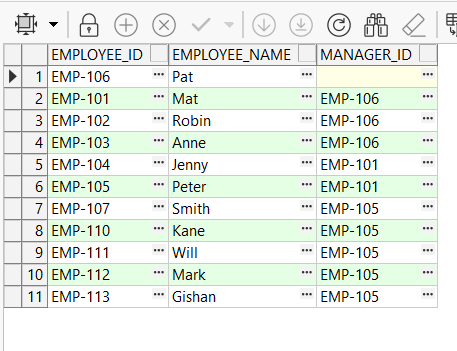
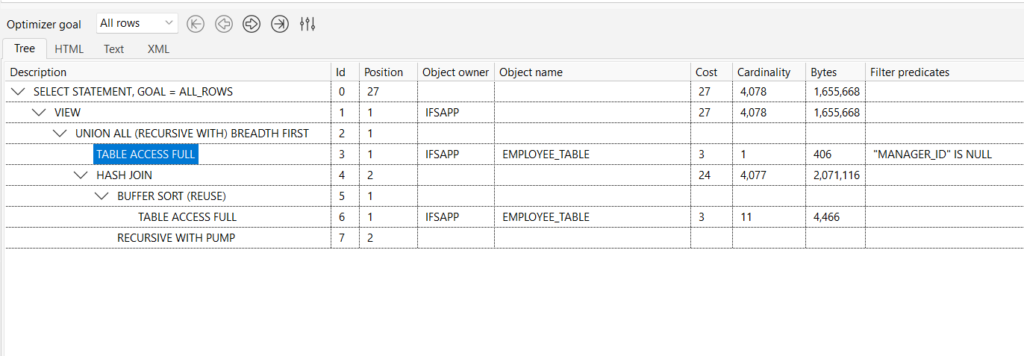
In the image above, you can see the hierarchy of the company. The first section takes the top manager, and the next section, Recursive Member, takes the remaining employees for the list. Finally, the main query shows all the records selected by the recursive common table expression.
Recursive common table expression is not only for fetch queries; the two examples below show how to use them in a concatenation or in a mathematical expression. Also, this can be used to create a list of dates (see Compare date examples)
--
WITH cte_no (n) AS
(
  SELECT 1
  UNION ALL
  SELECT n + 1 FROM cte_no WHERE n < 4
)
SELECT * FROM cte_no;
+------+
| n    |
+------+
|    1 |
|    2 |
|    3 |
|    4 |
+------+
--
CTEs performance impact
A common table expression can improve performance, and it varies depending on the execution plan. CTE gives a performance benefit over alternatives like subqueries or temporary tables.
Reducing records Early
A common table expression fetches records early and keeps them for later use. Therefore no need to fetch records from the MAIN query. Most of the times, CTE keep common datasets to use later. Then, the time is saved for the repeated data fetches.
Recursive Queries
CTEs are able to use recursive and hierarchical queries. Syntax is very easy to use. There is a CTE Recursive example in the above example. There is another way is fetch hierarchical queries by using CONNECT BY PRIOR.
Note: We normally use a database index for better performance. Here we don’t have such an example. But it’s open to use on where condition attribures
CTEs in UPDATE, DELETE Statements
The last part of this article is to update the query using CTE values. Therefore, CTE needs to load values and then use those records to update with new values.
--
WITH LongOldEmployees AS (
    SELECT employee_id
    FROM employee_table
)
-- Update name by adding sufix employees identified in the CTE
UPDATE employee_table
SET employee_name = employee_name || ‘updated’
WHERE employee_id IN (SELECT employee_id FROM LongOldEmployees);
--
LongOldEmployees table fetches the required dataset that needs to be updated. The main query is doing the update part with new values. Similarly, deletion is also possible with common table expressions.
Conclusion
PL/SQL Common Table Expressions gives a good tool for simplifying complex queries with readable, clear code. temporary result sets that are used in future queries, especially recursion and hierarchical data processing.
CTEs make code more readable, maintainable, and perform better in most cases than traditional subqueries and temporary tables. Thus, with CTEs.
