

How to convert a string to a date in Oracle? Is there a function in Oracle? It is very easy to Oracle cast string to date with the TO_DATE function. To convert different types of String columns to DATE type using those custom formats, TO_DATE() helps Oracle cast string to date.
The TO_DATE () function is the most usable way for Oracle SQL to compare dates. This supports any format that can be converted into DATE. Sometimes dates are saved in the table as VARCHAR; at that time, we must convert VARCHAR into DATE type, otherwise, it raises an error when running.
Syntax for the TO_DATE function
--
TO_DATE (string, format [, nls_language])
--
TO_DATE() function has three parameters, like below
String: this string you want to convert date value. This can be a type of CHAR, VARCHAR2, NCHAR, or NVARCHAR2 data type, or null.
Format: format parameter is optional. If this is not available, the standard format is DD-MON-YY, such as 31-DEC-2026.
nls_language: this is Optional. This is the session language is the default language.
Oracle cast string to date examples
Below shows different kinds of examples that string cast to date in Oracle
Oracle cast string to date standard way
As I mentioned above, we have to put the first parameter. Instead, the default format is going to DD-MON-YY. So, if you entered the first parameter like below standard return date should be like 31-DEC-2026, as an example.
--
SELECT TO_DATE('31-DEC-2030')
FROM dual;
//Output
2030-12-31 00:00:00.000
--
Oracle cast string to date with formatting
In the above example, there is NO input string format. Because it is optional. But our string format does not match with standard format. Oracle gives an error “ORA-01861: literal does not match format string”. In such a situation, you have to add an input string format for Oracle.
Then oracle map string format with the input string value and return the correct date type as output. We can have different literals as a format. Some of those are shown in the list below
--
SELECT TO_DATE('2028-08-05', 'YYYY-MM-DD')
FROM dual;
//Output
2028-08-05 00:00:00.000
--
Oracle cast string to date with time
You can see there are different types of formats, and those formats are able to be used as an input format when casting into a date type. Usually use date and time format as a string but we want to change it to a date type. In such a case below I added a format as a date time input.
--
SELECT TO_DATE('2028-05-05 14:30:00', 'YYYY-MM-DD HH24:MI:SS')
FROM dual;
//Output
2028-05-05 14:30:00.000
--
Oracle SQL Compare Dates
example below uses of TO_DATE () function for another purpose. It is the most usable way for Oracle SQL to compare dates in a query at runtime. The above example is only returning our date type value, but here that return value is used to compare it with another column or another use input parameter value.
We can’t compare a String with a date without converting it into the same type. Therefore here first convert and then use Date in the WHERE Clause in Oracle to compare values.
- MAIN_ORDERS that finish(END_DATE) before DEC/11/2026 12:00:00 AM and NEED_DATE after JAN/16/2025
--
select * from main_orders
where end_date <= date '2023-12-11'
and to_date(need_date,'YYYY-MM-DD HH24:MI:SS')> '16-JAN-2024';
--
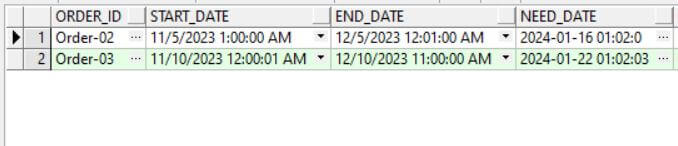
This query shows MAINORDERS which are an end_date less than 2023-DEC-11 and need_date after 2024-JAN-16. But you note that two columns are into data types, but still, we can convert data into DATE datatype from any other formats
Let’s use another way of Oracle SQL to compare dates by using TO_DATE () function. In this query, try to compare dates in those columns in different formats. See our query bit harder compared to the earlier one
- MAIN_ORDERS that starting(start_date) from 2 months and 12 days earlier than required date( need_date)
Now we are trying to compare the start_date and need_date columns, which are in DATE and VARCHAR type, but we can still compare those with our requirements.
--
select * from main_orders
where start_date < add_months(to_date(need_date,'YYYY-MM-DD HH24:MI:SS')-12,-2) ;
--

If I explain a bit on query first, we convert the VARCHAR type column date into DATE format and then reduce 12 days first, then try to reduce 2 months by using the ORACLE add_months function.
After that comparison, the date we reduced is still less or not. Now, the query returns output for MAIN_ORDERS that started (start_date) from 2 months and 12 days earlier than the required date(need_date).
Oracle cast string to date with months
Now you know how to use the second parameter on the TO_DATE () function. If you change the format input should be according to that. Below are examples showing the use month as an input.
--
SELECT TO_DATE('May 9, 2026', 'Month DD, YYYY')
FROM dual;
//Output
2026-05-09 00:00:00.000
--
Oracle cast string to date with DEFAULT
Here, what happens is that the input is not correct. But you don’t want to return errors from Oracle. Once the input is not valid, then return the DEFAULT value. In this example month spelling is not correct. Then Oracle thinks this does not match with input format in the second parameter.
So, Oracle must return an error. But without returning errors, output shows the default value by the user has defined on error.
--
SELECT TO_DATE('Febuary 15, 2016, 11:00 A.M.'
       DEFAULT 'January 01, 2016 12:00 A.M.' ON CONVERSION ERROR,
       'Month dd, YYYY, HH:MI A.M.') "Value"
  FROM DUAL;
//Output
2016-01-01 00:00:00.000
--
TO_DATE with different return format
The value returned by Oracle format can be changed by setting NLS_TERRITORY. This is used to show values in a user-friendly manner.
--
ALTER SESSION SET NLS_TERRITORY = 'KOREAN';
//Output
26/01/15
ALTER SESSION SET NLS_TERRITORY = 'AMERICA';
//Output
15-JAN-26
--
Oracle cast string to date common errors
What happens if you enter the wrong format as input, then Oracle returns this error saying the format cannot able to be identified by Oracle. Error is “ORA-01821: date format not recognized”
--SELECT TO_DATE('250505', 'YYYYMD') result
FROM dual;
//ERROR
ORA-01821: date format not recognized
--
As I mentioned above, there can be a literal error if you did not add the correct format to the input. “ORA-01861: literal does not match format string”.
This function does not cast CLOB data directly. Also, there are other types of casting functions available: TO_DATE(this), TO_TIMESTAMP, TO_TIMESTAMP_TZ, TO_YMINTERVAL, TO_DSINTERVAL
NLS language for localized TO_DATE
This is for languages. You want it in another language, then the third parameter of the TO_DATE function is used to specify our required language. Examples below show values in different languages.
Use the NLS_DATE_LANGUAGE parameter to set your language.
--
SELECT TO_CHAR(SYSDATE, 'DD-MON-YYYY', 'NLS_DATE_LANGUAGE=SPANISH') FROM dual;
//Output
27-JUL-2025
SELECT TO_CHAR(SYSDATE, 'DD-MON-YYYY', 'NLS_DATE_LANGUAGE=FRENCH') FROM dual;
//Output
27-JUIL.-2025
SELECT TO_CHAR(SYSDATE, 'DD-MON-YYYY', 'NLS_DATE_LANGUAGE=TURKISH  ') FROM dual;
//Output
27-TEM-2025
--
Summary
- Use the TO_DATE() function mainly on Oracle CAST string to date. But we can use compare dates in Oracle in a query as well.
- The default date format depends on the NLS_DATE_FORMAT, and mostly it is DD-MON-YY
Ref: Oracle
