

The Oracle Count function returns only the number of records available for the attribute. But how to take a Distinct count in Oracle?
COUNT ( [ DISTINCT | ALL ] Expression): Count is an aggregate function that counts the number of records in an expression. DISTINCT eliminates duplicates
Only one DISTINCT value is possible in the select statement with the query. Therefore, it is not possible to add multiple DISTINCT statements for a single query.
COUNT(DISTINCT column_name) ignores the NULL values because NULL values are not taken as column values for DISTINCT.
The query performance of COUNT(DISTINCT …) will be slower than that of COUNT(*) because DISTINCT performs sorting before counting unique values. Now move to the Simple example of Distinct Count in Oracle.
Coverage
- COUNT(ALL job_title ): Count all excluding Null Values
- COUNT(*): Count ALL including Null Values
- COUNT(DISTINCT job_title): Count All Unique values, excluding Null Values
- COUNT (UNIQUE job_title): Count All Unique values, excluding Null Values
Distinct count in Oracle examples
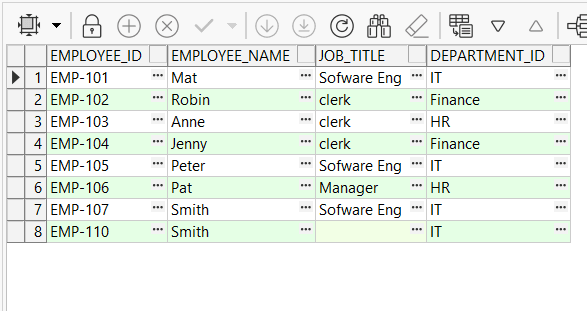
Here, let’s take a simple example on the employee table including job Title and department columns.
--
CREATE TABLE employee_table(
    employee_id VARCHAR2(50) ,
    employee_name VARCHAR2(100) ,
    job_title VARCHAR2(50) ,
    department_id VARCHAR2(50) ,
    PRIMARY KEY(employee_id)
);

declare

begin


   INSERT INTO employee_table (employee_id, employee_name, job_title ,department_id)
   VALUES ('EMP-'||101,'Mat', 'Sofware Eng', 'IT');
    INSERT INTO employee_table (employee_id, employee_name, job_title ,department_id)
   VALUES ('EMP-'||102,'Robin', 'clerk', 'Finance');
    INSERT INTO employee_table (employee_id, employee_name, job_title ,department_id)
   VALUES ('EMP-'||103,'Anne', 'clerk', 'HR');
    INSERT INTO employee_table (employee_id, employee_name, job_title ,department_id)
   VALUES ('EMP-'||104,'Jenny', 'clerk', 'Finance');
    INSERT INTO employee_table (employee_id, employee_name, job_title ,department_id)
   VALUES ('EMP-'||105,'Peter', 'Sofware Eng', 'IT');
    INSERT INTO employee_table (employee_id, employee_name, job_title ,department_id)
   VALUES ('EMP-'||106,'Pat', 'Manager', 'HR');
    INSERT INTO employee_table (employee_id, employee_name, job_title ,department_id)
   VALUES ('EMP-'||107,'Smith', 'Sofware Eng', 'IT');
    INSERT INTO employee_table (employee_id, employee_name, job_title ,department_id)
   VALUES ('EMP-'||110,'Smith', NULL, 'IT');
end;
--
Distinct in Inner Query
First, we can take all the unique JOB_TITLEs and then count the number of unique JOB_TITLEs.
--
SELECT COUNT(job_title)
FROM (SELECT DISTINCT job_title FROM employee_table)
-----------------
Result
COUNT(job_title)
3
--
DISTINCT inside the COUNT
--
SELECT COUNT(DISTINCT  job_title)
FROM employee_table;
Result
COUNT(*)
3
--
Distinct count in Oracle for multiple columns
If you need to take DISTICT values for multiple columns, we can take unique values through the inner query and then create a count for it.
--
SELECT COUNT(*)
FROM (SELECT DISTINCT job_title,department_id FROM employee_table)

Result
COUNT(job_title)
5
--
COUNT with WHERE Condition
We are free to add any valid condition for the WHERE clause. Then returns the filtered list first and then takes the unique count.
--
SELECT COUNT(DISTINCT (job_title ))
FROM employee_table
WHERE department_id = 'IT';

Result
COUNT(job_title)
1
--
UNIQUE count in Oracle
UNIQUE keyword used to return unique values for the column. UNIQUE returns the values except NULL values. Other than that, all the other features are the same with DISTINCT.
--
SELECT COUNT (UNIQUE  job_title) as Total
FROM employee_table;
Result
COUNT(job_title)
3
--
SQL COUNT( ) with All
Count All returns all the NOT NULL values for the column. But COUNT(*) returns all the values, including NULL rows.
- COUNT(ALL job_title ): Count all excluding Null Values
- COUNT(*): Count ALL including Null Values
- COUNT(DISTINCT job_title): Count All Unique values, excluding Null Values
- COUNT (UNIQUE job_title): Count All Unique values, excluding Null Values
--
SELECT COUNT(ALL job_title )
FROM employee_table;
Result
COUNT(job_title)
7

SELECT COUNT(*)
FROM employee_table;

Result
COUNT(*)
8

SELECT COUNT(DISTINCT  job_title)
FROM employee_table;
Result
COUNT(job_title)
3


--
SELECT COUNT (UNIQUE  job_title) as Total
FROM employee_table;
Result
COUNT(job_title)
3
--

SELECT COUNT (UNIQUE job_title), COUNT (DISTINCT job_title)
FROM employee_table;
Result
(UNIQUE job_title), (DISTINCT job_title)
3                   3
--
Same as the DISTINCT keyword GROUP BY clause also does a similar type of thing, but it is mostly used with AGGREGATE functions in Oracle.
Invalid distinct count in Oracle
There are multiple distinct columns not able to be used in a single select statement. This will give you an error on the Oracle database.
--
SELECT COUNT(DISTINCT (job_title ))), COUNT(DISTINCT (department_id)))
FROM employee_table
--
Summary
Distinct Count in Oracle is used to take the Unique value COUNT for a specific column. There are several ways to take those COUNT, but performance-wise wise those are not much different.
COUNT ( [ DISTINCT | ALL ] Expression): Count is an aggregate function that counts the number of records in an expression. DISTINCT eliminates duplicates
Ref https://www.w3resource.com/sql/select-statement/queries-with-distinct-multiple-columns.php
